

Practical planning notes
Pickup and delivery capacity: follow the load through the route
A vehicle can have enough room for every individual job and still run out of capacity along a combined route. The important question is not only how much work is assigned. It is what is on board after each collection and delivery.
 Flowtlas Planning basics4 min read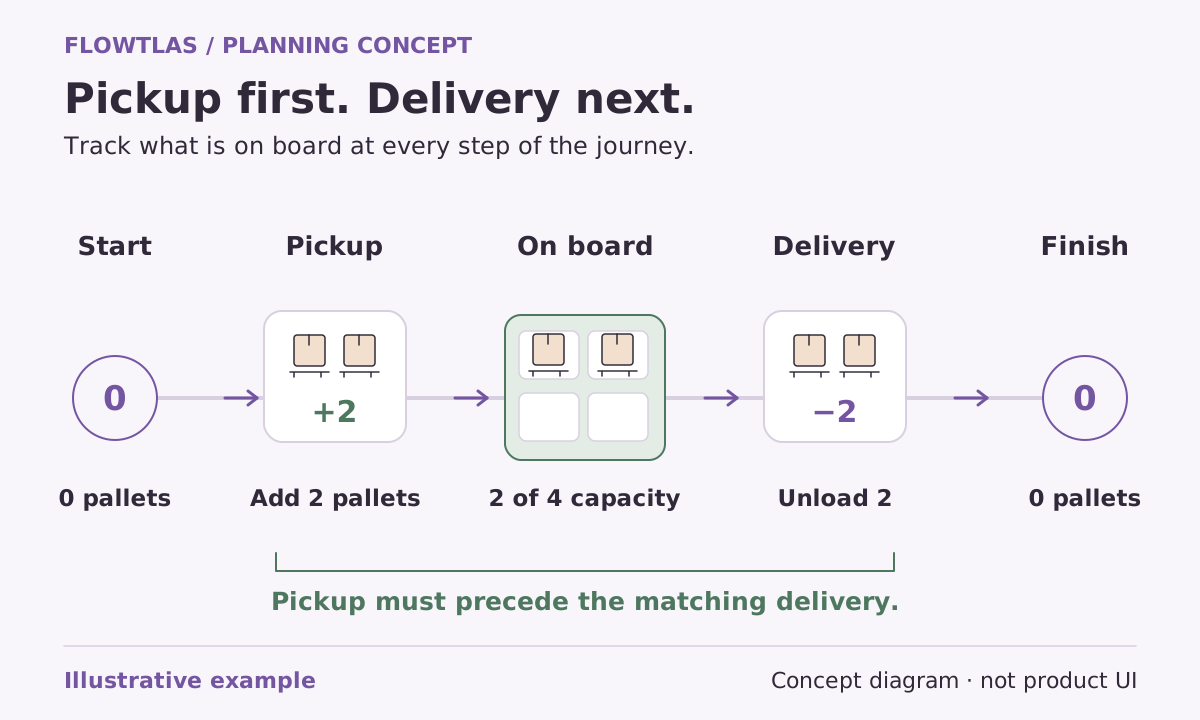
The short version
Check capacity as a changing load along the route, not as a single total at departure.
Describe the whole job as connected work
A collection and its delivery belong to the same operational story. Sending someone to the delivery address is useless if the goods have not been collected. Keep the order, handling time and access requirements visible when you prepare the work, rather than treating each address as an unrelated visit.
Flowtlas’s planning engine can represent an ordered chain of stops within one task on the same tour. Each stop can carry its own duration, window and positive or negative load change. The request also needs the vehicle’s capacity and any starting load already on board. [3]
Start with what is actually on board
Ask where the route begins operationally, not just geographically. A van may leave its start location empty, partly loaded or carrying returns from earlier work. Record the correct starting position. Otherwise a delivery can appear to remove goods that were never present, or a collection can appear to fit space that is already occupied.
For a fictional collection-and-delivery operation, imagine a van carrying outbound goods before it visits a supplier. A direct supplier visit might be attractive on the map but unsuitable while those goods remain on board. Making a delivery first could change the capacity picture. This is an illustrative decision, not a solved route or measured outcome.
Agree capacity names and units before comparing loads
Choose capacity dimensions that reflect the operation. A weight limit answers a different question from a pallet-space limit. Document each dimension’s name and unit, and make sure the vehicle and task records use the same convention. A correct quantity entered against the wrong unit can undermine the entire request.
The Flowtlas engine supports named capacity dimensions using consistent names, units and integer values across capacity and load fields. This is not automatic unit conversion or physical packing. Satisfying a volume limit alone does not establish that awkwardly shaped goods will fit through a door or can be secured safely. [3]
| Record | Check before planning |
|---|---|
| Vehicle capacity | The limit and unit for every relevant dimension |
| Starting load | Goods already on board when the tour starts |
| Collection stop | Load added, handling time and access window |
| Delivery stop | Load removed and its preceding collection or starting stock |
| Special handling | Requirements that the numeric capacity model does not describe |
Make reloads and disposal visits explicit
Some routes need an intermediate stop to reload, unload collected material or complete another service. Treat that stop as work with a real location and duration. Discuss who chooses the facility and who confirms its access conditions before assuming it can serve as a convenient reset in the route.
Flowtlas’s task model can express an explicitly supplied intermediate stop in an ordered chain. Labelling it “reload” or “disposal” does not automatically choose the best facility, manage inventory or supply industry-specific rules. Those responsibilities need their own verified process or integration. [3]
Review the load sequence alongside the timetable
When inspecting a candidate plan, follow the load from the start through every change. Then check the same sequence against visit windows and handling durations. A capacity-friendly order may conflict with site access; a timing-friendly order may collect goods before enough space has been released. Neither view is sufficient by itself.
Keep an exception list for missing quantities, unclear units and unresolved handling requirements. Resolve those with the operational owner instead of treating a generated plan as validation of the source data. Before relying on this workflow, confirm which Flowtlas generation functions and integrations are available for your workspace. [3]
Take it into your next planning session
Practical checklist
- Connect each collection with its delivery in the intended order.
- Verify starting load rather than assuming an empty vehicle.
- Use consistent units and signs for every load change.
- Review timing, handling and capacity together.
Product references
These Flowtlas pages explain the planning model. Confirm enabled functions and integrations for your workspace before relying on a workflow.